Free Wildcard Domain Email with Cloudflare + SMTP2GO
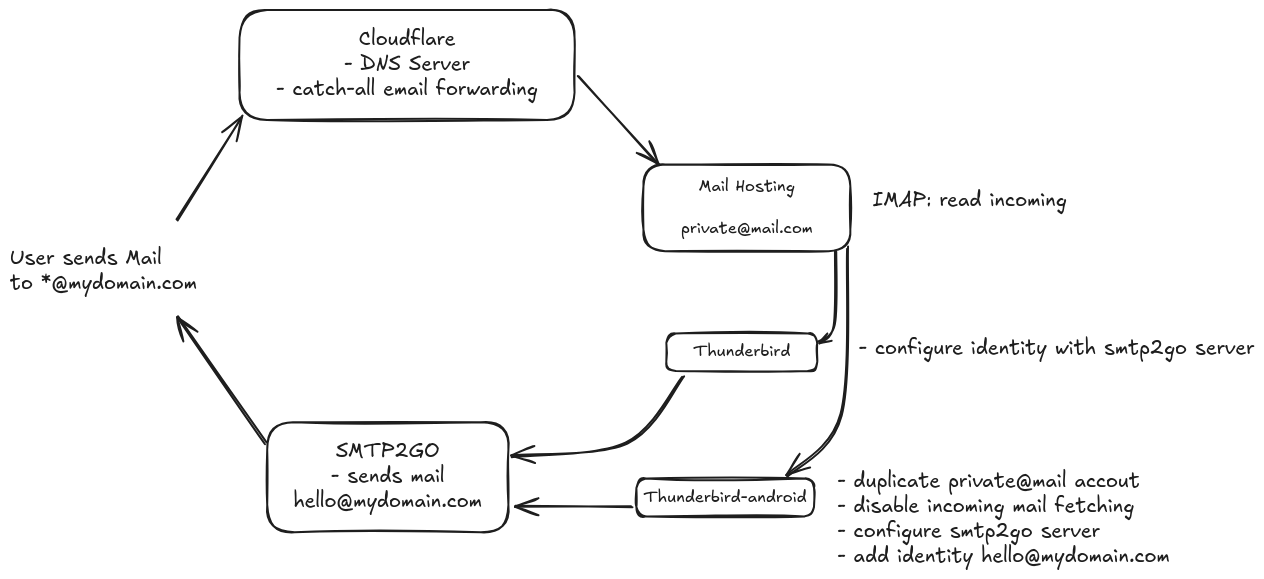
Here’s how I set up my domain so I can receive emails sent to it and reply from my domain address—while still using my private email account behind the scenes.
Key Facts
- Domain registrar: porkbun.com | An oddly satisfying experience.
- I migrated from my previous registrar Epik.com because theyre DynDNS API broke. I host my website on my hl-nas and dont have a static IP address, so I periodically have to update the DNS to point to the right address.
- DNS Management: Cloudflare
- Cloudflare supports wildcard catch-all email routing
- This means any email sent to *@fabianuntermoser.com is forwarded to my personal mail account
- SMTP Service (for sending emails): SMTP2GO: Reliable & Scalable Email Delivery Service
- This is crucial to fulfill SPF, DKIM and DMARC requirements and prevent your mails from landing in SPAM
Walkthrough
Configure Cloudflare DNS & Catch-all Email Routing
- Configure Cloudflare DNS for your domain
- Remove existing MX DNS records
- Enable catch-all Email forwarding to your personal mail account
Configure SMTP2GO for Sending Emails
- Setup SMTP2GO and configure their DNS CNAME records in Cloudflare
- be sure to disable the proxy option so that it says DNS only
- verify DNS records on SMTP2GO
- Create SMTP User in SMTP2GO
- Now you can configure and authenticate yourself using their SMTP Service
SMTP server: mail.smtp2go.com
SMTP port: 2525 (or 80, 25, 8025 or 587 if that doesn’t work).
Configure Mail Clients
- Thunderbird Desktop
- Configure your personal mail account so you can receive Emails
- Add an Email identity to your personal mail account for your domain
hello@fabianuntermoser.com - Configure the SMTP server from SMTP2GO for this identity
- Thunderbird Android
- The mobile version comes with the limitation of not supporting multiple SMTP Servers for one account.
- Find the sheer number of frustrated PR issues here GitHub: Feature request: different SMTP for each identity · Issue #1117 · thunderbird/thunderbird-android
- We can bypass this by adding our personal mail account twice.
- One is for receiving emails and sending Emails using our private account
- The second is to be able to reply to Emails using our our own domains name.
- For this create the duplicate private mail account
- Disable fetching mails entirely
- Change the SMTP Server to the one from SMTP2GO
- Create an identity for this duplicate account
- Now when receiving emails on your personal account, you can choose from which identity you want to reply from. Choose the identity that uses the SMTP2GO Server and your good to go.
- The mobile version comes with the limitation of not supporting multiple SMTP Servers for one account.
Why Using Free Gmail Variant is Insufficient
There is also the possibility of replying to emails with your custom domain with gmail by configuring an email alias. With this approach you would configure Cloudflare to forward emails to your Gmail address, and configure your desired domain email as an alias in Gmail. Then configure Cloudflare SPF record in your DNS Settings and include google as a valid sender adress using the __include keyword: v=spf1 include:_spf.mx.cloudflare.net __include:_spf.google.com__ ~all.
While this allows you to reply using your custom domain, the recipient will most likely flag the email as not trustworthy and might put it in spam.
You would need to configure DMARC on Google but this is not possible in the free version, but it is with Google Workspaces.
You can easily validate if your Email satisfies common security requirements by sending a mail to About My Email.
Resources